Routing tables
A routing table is a file that contains a set of rules that shows information on what path a data packet takes its destination.
The table itself is not the mysterious part. The mysterious part is what the kernel actually does when two rows in that table both claim to know where a packet belongs. That happens constantly in real networks.
So let’s watch it happen on a machine.
I’m using Linux’s ip route tooling throughout, because it’s what I have and it’s what most servers run. The concept transfers to any device with a FIB (forwarding information base), your home router, a Cisco box, your laptop, but the exact command syntax won’t.
Building The Lab
I don’t want to touch a real interface for this, so I’m going to build the whole thing inside a Linux network namespace. If I get something wrong, the blast radius is small.
$ ip netns add lab
$ ip netns exec lab ip link set lo up
Now four veth pairs, each one standing in for a different “way out.” The physical version of this box is a router with four uplinks, or a VPC with four route targets; the namespace is that router with the wires renamed:
$ for i in 0 1 2 3; do
    ip link add veth$i type veth peer name veth${i}p netns lab
    ip link set veth$i up
    ip netns exec lab ip link set veth${i}p up
  done

$ ip netns exec lab ip addr add 169.254.100.1/32 dev veth0p
$ ip netns exec lab ip addr add 169.254.100.2/32 dev veth1p
$ ip netns exec lab ip addr add 169.254.100.3/32 dev veth2p
$ ip netns exec lab ip addr add 169.254.100.4/32 dev veth3p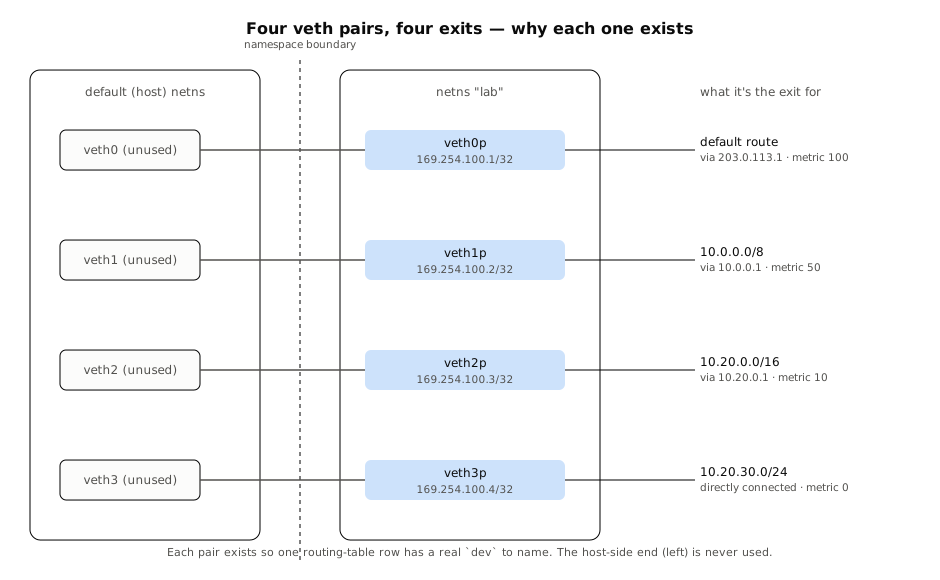
Veth pair is Linux’s version of a virtual patch cable, it’s always created as two ends at once, and whatever goes in one end comes out the other. When I ran ip link add veth0 type veth peer name veth0p netns lab, I created one cable with one end (veth0) left sitting on the host and the other end (veth0p) dropped inside the lab namespace. I made four of these cables, so I ended up with four “exits” the namespace can route traffic toward, which is functionally the same situation as a physical router with four uplink ports, or a cloud VPC with four route targets. The namespace doesn’t know or care that its four interfaces are virtual; as far as the kernel’s FIB is concerned, veth0p, veth1p, veth2p, veth3p are just as real as four physical NICs. “The wires renamed” is the point same concept as a fake hardware.
I gave each interface a /32, deliberately. With /32s in place, nothing is auto-connected to anything. Every route I add from here has to be added explicitly, which means the table only contains what I put there, nothing implicit to trip over.
The table, one row at a time
Four routes, four different scopes, on purpose:
$ ip netns exec lab ip route add default \
    via 203.0.113.1 dev veth0p onlink metric 100

$ ip netns exec lab ip route add 10.0.0.0/8 \
    via 10.0.0.1 dev veth1p onlink metric 50

$ ip netns exec lab ip route add 10.20.0.0/16 \
    via 10.20.0.1 dev veth2p onlink metric 10

$ ip netns exec lab ip route add 10.20.30.0/24 \
    dev veth3p metric 0
That onlink flag on the first three is worth pausing on, because it’s exactly the gateway question made concrete. Ordinarily the kernel refuses to add a route through a gateway it can’t prove is directly reachable, it wants the gateway’s address to fall inside a subnet one of your interfaces already owns. My /32 addresses don’t own any subnet, so by the kernel’s default rules, 203.0.113.1 is unreachable and the route should be rejected. onlink is me telling the kernel “trust me, treat this next hop as reachable, don’t check.”
Here’s the table the kernel is actually holding, read straight back:
$ ip netns exec lab ip route show
default via 203.0.113.1 dev veth0p metric 100 onlink
10.0.0.0/8 via 10.0.0.1 dev veth1p metric 50 onlink
10.20.0.0/16 via 10.20.0.1 dev veth2p metric 10 onlink
10.20.30.0/24 dev veth3p scope link
Reading a row
Before we go further, let’s name the parts of what we’re looking at, because every one of them is about to matter:
default via 203.0.113.1 dev veth0p  metric 100 onlink
└──┬──┘└────────────┬──┘└──────┬─┘  └────┬───┘ └─┬──┘
prefix next hop interface cost flag- Prefix (destination), the claim itself.
defaultis shorthand for0.0.0.0/0, the claim about everything; IPv6 spells the same idea::/0and plays by identical rules.10.0.0.0/8is a claim about an eighth of the address space. The number after the slash is the prefix length, and it’s the one field the whole lookup sorts on. - Next hop (gateway), who to hand the packet to, if this row wins. Notice the fourth route has no
viaat all, that’s the directly-connected case, where the destination is reachable on the wire behindveth3pand there’s no intermediate hop. - Interface, which device the packet leaves through.
- Metric (cost), only consulted on a tie, which we haven’t built yet.
- Flags,
scope linkis the kernel’s own note that a destination is directly attached;onlinkis the one I forced, over the kernel’s objection, two paragraphs ago.
Five fields, but the lookup reads exactly one of them to pick a winner. The rest are instructions for what to do after the winner is chosen. That asymmetry is the whole article, and we’re about to watch it happen.
Nested claims
Back to the table. Notice the four rows aren’t independent options, they’re nested claims:
┌ 0.0.0.0/0        via 203.0.113.1  dev veth0p  metric 100 ─────────────┐
│ ┌ 10.0.0.0/8     via 10.0.0.1     dev veth1p  metric 50 ────────────┐ │
│ │ ┌ 10.20.0.0/16 via 10.20.0.1    dev veth2p  metric 10 ──────────┐ │ │
│ │ │ ┌ 10.20.30.0/24               dev veth3p  metric 0 ────────┐  │ │ │
│ │ │ └──────────────────────────────────────────────────────────┘  │ │ │
│ │ └───────────────────────────────────────────────────────────────┘ │ │
│ └───────────────────────────────────────────────────────────────────┘ │
└───────────────────────────────────────────────────────────────────────┘
The table as nested claims: an address inside the /24 also satisfies the three rows outside it.
Any address inside 10.20.30.0/24 also technically satisfies the /16 and /8 rows above it, and every address satisfies the default route. So for most destinations in this lab, there isn’t one matching row, there are several. That’s not a bug in my table. That’s every real routing table, all the time. The interesting question was never “does this match,” it’s “which match wins.”
Four lookups, no guessing
Readers with sharp eyes have probably already worked out the ranking from the nesting diagram above. Here’s the prediction, stated as a diagram before we ask the kernel:
10.20.30.9  ─→ /24 ✓ ──────────────────────────────── veth3p
10.20.5.5   ─→ /24 ✗ ─→ /16 ✓ ─────────────────────── veth2p
10.5.5.5    ─→ /24 ✗ ─→ /16 ✗ ─→ /8 ✓ ─────────────── veth1p
8.8.8.8     ─→ /24 ✗ ─→ /16 ✗ ─→ /8 ✗ ─→ /0 ✓ ─────── veth0p
Each lookup stops at the narrowest claim that is still true; metric is never consulted.
Now let’s check the kernel’s homework rather than trust the diagram:
$ ip netns exec lab ip route get 10.20.30.9
10.20.30.9 dev veth3p src 169.254.100.4 uid 0
    cache

$ ip netns exec lab ip route get 10.20.5.5
10.20.5.5 via 10.20.0.1 dev veth2p src 169.254.100.3 uid 0
    cache

$ ip netns exec lab ip route get 10.5.5.5
10.5.5.5 via 10.0.0.1 dev veth1p src 169.254.100.2 uid 0
    cache

$ ip netns exec lab ip route get 8.8.8.8
8.8.8.8 via 203.0.113.1 dev veth0p src 169.254.100.1 uid 0
    cache
ip route get doesn’t send a packet anywhere, it just runs the real FIB lookup the kernel would run and tells you the answer. Four destinations, and each one picked the narrowest claim that was still true about it, exactly in the order the diagram predicted: 10.20.30.9 gets the /24, 10.20.5.5 falls back to the /16 because it’s outside the /24, 10.5.5.5 falls back further to the /8, and 8.8.8.8, which matches nothing specific at all, lands on the default route.
Note what didn’t matter here: metric. The /24 route has a metric of 0 and the default route has a metric of 100, but metric never got consulted, because every one of these lookups only ever had a single candidate at its winning prefix length. Metric only exists for the case where two rows are tied on specificity, which is a case I haven’t built yet. Let’s build it.
Forcing an actual tie
I’ll add a second route to a prefix I haven’t used before, with a different gateway and a different cost, so the table now has two rows claiming the exact same /24:
$ ip netns exec lab ip route add 192.168.1.0/24 \
    via 192.168.1.1 dev veth1p onlink metric 50

$ ip netns exec lab ip route add 192.168.1.0/24 \
    via 192.168.1.2 dev veth2p onlink metric 10

$ ip netns exec lab ip route show | grep 192.168.1
192.168.1.0/24 via 192.168.1.2 dev veth2p metric 10 onlink
192.168.1.0/24 via 192.168.1.1 dev veth1p metric 50 onlink
Readers who remember the RTNETLINK collision from footnote one will recognize the shape: two rows, one prefix, one winner. The difference is that this time I wrote both rows on purpose.
                     ┌─ via 192.168.1.2  dev veth2p  metric 10  ← wins
192.168.1.0/24 ──────┤
                     └─ via 192.168.1.1  dev veth1p  metric 50
Two rows of identical specificity; metric breaks the only tie specificity cannot.
Both rows are exactly as specific as each other, same prefix, same length, no tiebreaker available from specificity alone. This is the one and only situation metric was built for:
$ ip netns exec lab ip route get 192.168.1.50
192.168.1.50 via 192.168.1.2 dev veth2p src 169.254.100.3 uid 0
    cache
Metric 10 beat metric 50. That’s the whole rule, stated as an ordering: sort by prefix length descending, then by metric ascending, take the top row. I called this the specificity-first lookup earlier, this is the “second” half of that phrase actually firing, for the first time in this whole lab, because it’s the first time it was needed.
What gateway and netmask were doing this whole time
It’s worth naming the two things explicitly now that we’ve watched them work rather than just read about them:
- Netmask decides eligibility. It’s the question “does this row even apply to this address,” answered before any comparison happens. A
/24is a narrow, picky claim; a/8is a loose, generous one. Netmask is also what makes specificity a well-defined, sortable number in the first place, prefix length is the sort key. - Gateway decides what happens after a row has already won. It never participates in choosing the winner. It only answers “now that I know which row applies, who do I physically hand this packet to”, a neighbor on the same wire (no gateway, like our
/24route straight outveth3p), or a next router that’s closer (a gateway, like10.0.0.1).
One question resolves the lookup. The other question only gets asked once the first one’s already answered.
The other half: where rows come from
Everything before this section treated the table as a given. I typed rows in, the kernel sorted the claims, we watched the lookup. But I never asked the question most introductions, including a video I watched while writing this, start from: how do rows get into the table in the first place? There are exactly three ways, and they map onto my lab more cleanly than you’d expect.
Directly connected routes are the ones I spent footnote, one energy avoiding. The moment you give an interface a real subnet, the kernel writes the row itself, claiming the subnet that interface now owns:
$ ip netns add pop
$ ip netns exec pop ip link set lo up
$ ip link add pop0 type veth peer name pop0p netns pop
$ ip link set pop0 up
$ ip netns exec pop ip link set pop0p up
$ ip netns exec pop ip addr add 10.99.0.1/24 dev pop0p

$ ip netns exec pop ip route show
10.99.0.0/24 dev pop0p proto kernel scope link src 10.99.0.1

$ ip netns delete pop
Notice the two tags my hand-typed rows never carried: proto kernel, the kernel signing its own work, and src, the address it will use as the packet’s source when it leaves through that interface. My fourth row from earlier, 10.20.30.0/24 dev veth3p scope link, was me impersonating a connected route with a static command. The real thing arrives on its own and brings its signature.
Static routes are the other three rows in my table, a human typing them in by hand, which is the only way to reach a network no interface is directly connected to. They come with the lesson the video spends most of its runtime on and I got to skip: a static route is one-directional. Telling one router how to reach a network says nothing to any other router about how to get back, because the return trip is a separate lookup in a separate table on a separate machine. When the return table merely disagrees with the forward one you get asymmetric routing, traffic whose return path differs from its forward path, completely normal on the internet and maddening to debug. When the return table is missing the row entirely, you get silence: requests arrive, replies vanish. My lab never felt any of this because ip route get only answers the forward question.
And when no row matches at all? The video’s router concludes the network “doesn’t even exist” and drops the packet. My kernel can say the same thing out loud; delete the one row that was catching everything and ask again:
$ ip netns exec lab ip route del default
$ ip netns exec lab ip route get 8.8.8.8
RTNETLINK answers: Network is unreachable
Network is unreachable is the kernel’s shrug: no claim covers this address, so there is nothing to sort and nothing to tie-break, and real traffic would die here,
usually with a small ICMP destination-unreachable note mailed back to the sender. That is the real job of a default route, by the way — not “the best path,”
but “the claim that keeps the lookup from ever coming up empty.” Restore it and the shrug disappears:
$ ip netns exec lab ip route add default via 203.0.113.1 dev veth0p onlink metric 100Dynamic routes are the third way, and the only reason anything bigger than a lab can run at all: routers learning reachability from each other instead of waiting
for a human to type. The names you’ll hear are RIP, OSPF, IS-IS, EIGRP, and BGP.[^4] On a machine running one of these, ip route show stops looking like my four
hand-typed rows and starts carrying provenance tags proto ospf, proto bgp the daemon’s signature, the same way proto kernel was the kernel’s.[^3]
 connected ──(proto kernel)───┐
 static    ──(typed by hand)──┼──▶  one table  ──▶  one lookup
 dynamic   ──(proto bgp/…)────┘     that never asks who wrote the row
Three ways in, one sorting rule. Population and lookup are the same file viewed from opposite ends.
Here’s the tie-back: the lookup does not care which of the three wrote the row. A connected route, a static route typed at 2am, and a BGP route learned from a peer three continents away all land in the same FIB and get sorted by the same rule, prefix length first, metric second. The video teaches the table as a roadmap for reaching places; this article taught it as a sorted set of claims. A complete mental model needs both halves. Everything before this section was, on purpose, only the second.
Cleaning up
The entire lab lives in one namespace and four veth pairs, none of which the host network ever saw:
$ ip netns delete lab

$ ip netns list
$ ip -brief addr show
lo               UNKNOWN        127.0.0.1/8
eth0             UP             192.0.2.2/24
Deleting the namespace destroys everything inside it, and destroying one end of a veth pair destroys the other, so there is nothing left to clean up by hand. No NAT (Network Address Translation), no forwarding enabled, no route ever pointed at a real address on the internet, every gateway in this lab (203.0.113.1, 10.0.0.1, 10.20.0.1, 192.168.1.1/.2) was either reserved documentation space or private address space that goes nowhere from inside an isolated namespace. That’s the actual safety guarantee here, and it’s also why this is worth doing yourself rather than just reading the output above: ip netns add lab, run everything through ip netns exec lab, and the moment you’re unsure whether a command is safe, it doesn’t matter, delete the namespace and start over.
Here is a ready made script to visualize this routing table
#!/bin/bash
# Routing Tables Lab - Specificity-first lookup demonstration
# Safe: everything runs inside a disposable network namespace

set -e

NS="lab"
RED='\033[0;31m'
GREEN='\033[0;32m'
YELLOW='\033[1;33m'
BLUE='\033[0;34m'
NC='\033[0m' # No Color

cleanup() {
    echo -e "\n${YELLOW}>>> Cleaning up...${NC}"
    ip netns delete "$NS" 2>/dev/null || true
    for i in 0 1 2 3; do
        ip link delete "veth$i" 2>/dev/null || true
    done
    echo -e "${GREEN}Cleanup complete.${NC}"
}

trap cleanup EXIT

echo -e "${BLUE}=== 1. Creating network namespace '$NS' ===${NC}"
ip netns add "$NS"
ip netns exec "$NS" ip link set lo up

echo -e "${BLUE}=== 2. Creating 4 veth pairs (virtual uplinks) ===${NC}"
for i in 0 1 2 3; do
    ip link add "veth$i" type veth peer name "veth${i}p" netns "$NS"
    ip link set "veth$i" up
    ip netns exec "$NS" ip link set "veth${i}p" up
done

echo -e "${BLUE}=== 3. Assigning /32 addresses (no auto-connected routes) ===${NC}"
ip netns exec "$NS" ip addr add 169.254.100.1/32 dev veth0p
ip netns exec "$NS" ip addr add 169.254.100.2/32 dev veth1p
ip netns exec "$NS" ip addr add 169.254.100.3/32 dev veth2p
ip netns exec "$NS" ip addr add 169.254.100.4/32 dev veth3p

echo -e "\n${GREEN}Interfaces inside namespace:${NC}"
ip netns exec "$NS" ip -brief addr show

echo -e "\n${BLUE}=== 4. Adding the four nested routes ===${NC}"
ip netns exec "$NS" ip route add default \
    via 203.0.113.1 dev veth0p onlink metric 100

ip netns exec "$NS" ip route add 10.0.0.0/8 \
    via 10.0.0.1 dev veth1p onlink metric 50

ip netns exec "$NS" ip route add 10.20.0.0/16 \
    via 10.20.0.1 dev veth2p onlink metric 10

ip netns exec "$NS" ip route add 10.20.30.0/24 \
    dev veth3p metric 0

echo -e "\n${GREEN}Routing table:${NC}"
ip netns exec "$NS" ip route show

echo -e "\n${BLUE}=== 5. Specificity-first lookups ===${NC}"
echo -e "${YELLOW}10.20.30.9  → should hit /24 (veth3p)${NC}"
ip netns exec "$NS" ip route get 10.20.30.9

echo -e "\n${YELLOW}10.20.5.5   → should hit /16 (veth2p)${NC}"
ip netns exec "$NS" ip route get 10.20.5.5

echo -e "\n${YELLOW}10.5.5.5    → should hit /8  (veth1p)${NC}"
ip netns exec "$NS" ip route get 10.5.5.5

echo -e "\n${YELLOW}8.8.8.8     → should hit default (veth0p)${NC}"
ip netns exec "$NS" ip route get 8.8.8.8

echo -e "\n${BLUE}=== 6. Forcing a metric tie-breaker ===${NC}"
ip netns exec "$NS" ip route add 192.168.1.0/24 \
    via 192.168.1.1 dev veth1p onlink metric 50

ip netns exec "$NS" ip route add 192.168.1.0/24 \
    via 192.168.1.2 dev veth2p onlink metric 10

echo -e "${GREEN}Two routes for the same prefix:${NC}"
ip netns exec "$NS" ip route show | grep 192.168.1

echo -e "\n${YELLOW}Lookup for 192.168.1.50 → lower metric (10) must win${NC}"
ip netns exec "$NS" ip route get 192.168.1.50

echo -e "\n${BLUE}=== 7. What happens with no matching route ===${NC}"
ip netns exec "$NS" ip route del default
echo -e "${YELLOW}After deleting default route:${NC}"
ip netns exec "$NS" ip route get 8.8.8.8 2>&1 || true

# Restore it
ip netns exec "$NS" ip route add default via 203.0.113.1 dev veth0p onlink metric 100

echo -e "\n${BLUE}=== 8. Bonus: Kernel auto-created connected route ===${NC}"
ip netns add pop
ip netns exec pop ip link set lo up
ip link add pop0 type veth peer name pop0p netns pop
ip link set pop0 up
ip netns exec pop ip link set pop0p up
ip netns exec pop ip addr add 10.99.0.1/24 dev pop0p

echo -e "${GREEN}Kernel automatically created this route:${NC}"
ip netns exec pop ip route show

ip netns delete pop
ip link delete pop0 2>/dev/null || true

echo -e "\n${GREEN}========================================${NC}"
echo -e "${GREEN} Lab finished successfully!${NC}"
echo -e "${GREEN} The namespace will be destroyed on exit.${NC}"
echo -e "${GREEN}========================================${NC}"
echo -e "\nYou can re-run this script anytime. Everything is self-contained."
Author’s note: To make this article accessible to a wider audience, technical IT terms are given inline definitions, hover or tap a underlined term to see what it means.
Did I make a mistake? Please considerSend Email With Subject